
For players jumping into MLB The Show 26, finding the right settings can make a huge difference in how the game feels and performs. Whether you are playing casually, grinding Diamond Dynasty, or competing online, the correct configuration can improve batting timing, pitching accuracy, and overall control responsiveness.
This guide breaks down the best MLB The Show 26 settings to help you improve your gameplay, sharpen your reactions, and get the most out of every at-bat and pitch.
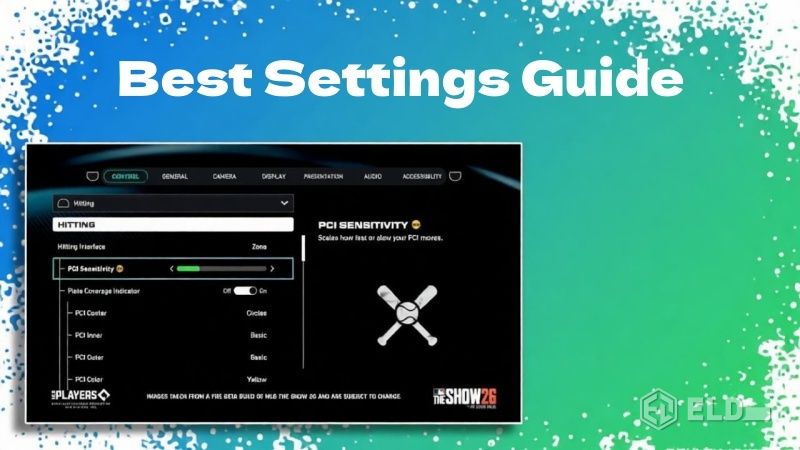
Why Settings Matter in MLB The Show 26
Baseball simulation games rely heavily on timing, precision, and visual clarity. Small adjustments to gameplay settings can significantly impact how well you read pitches, control your swings, or aim your throws.
The right settings can help players:
·Track pitches more easily
·Improve batting timing
·Gain better pitching control
·Reduce input lag
·Customize the experience to match skill level
Many competitive players spend time adjusting these options early to ensure smoother gameplay throughout the season.
Best Batting Settings
Batting is one of the most skill-based mechanics in MLB The Show 26. Selecting the right hitting interface and camera view can dramatically improve your performance at the plate.
Hitting Interface
The most recommended hitting interface for most players is Zone Hitting.
Zone hitting allows you to manually control the PCI (Plate Coverage Indicator), giving you more control over where the bat meets the ball. While it requires practice, it provides the highest skill ceiling and is widely used by experienced players.
Other options include:
·Directional hitting - simpler but less precise
·Timing hitting - focuses only on swing timing
For competitive play, Zone Hitting remains the best choice. Pairing this setup with top-tier MLB The Show 26 Stubs lets you acquire elite hitters who maximize the effectiveness of your chosen hitting interface.
PCI Settings
Customizing your PCI can help you track pitches more easily.
Recommended settings include:
·PCI Center: Diamonds or Basic
·PCI Inner: None or Fade
·PCI Outer: None
·PCI Color: Bright colors such as cyan, yellow, or white
Bright PCI colors help improve visibility against different stadium backgrounds and pitch speeds.
Batting Camera
Camera angle has a major impact on pitch recognition. Many players prefer Strike Zone cameras because they provide a closer view of the pitcher and the ball.
Popular camera choices include:
·Strike Zone
·Strike Zone 2
·Strike Zone High
These views make it easier to identify pitch types and react to fastballs or breaking balls.
Best Pitching Settings
Pitching settings determine how accurately you can control your throws and place the ball within the strike zone.
Pitching Interface
The most commonly recommended pitching interface is Pinpoint Pitching.
Pinpoint pitching rewards precise input timing and allows players to control pitch accuracy more effectively. When mastered, it produces extremely consistent results.
Other pitching options include:
·Meter pitching
·Pure analog pitching
·Classic pitching
While these methods are easier to learn, they generally offer less precision than pinpoint pitching.
Pitching Camera
The Pitcher Offset camera is a popular choice because it provides a balanced perspective of both the strike zone and batter position.
Some players also prefer:
·Pitcher Zoom
·Pitcher Wide
These camera angles help players better visualize pitch placement before releasing the ball.
Fielding Settings
Defense plays a major role in preventing runs, and fielding settings should allow you to react quickly to hits and base-running situations.
Throwing Interface
For the best control, players often use Button Accuracy Throwing.
This option adds a timing mechanic that helps ensure more accurate throws. When used correctly, it reduces throwing errors and gives players better control during double plays or long throws from the outfield.
Other throwing options include:
·Button throwing
·Analog throwing
However, Button Accuracy is generally considered the most reliable.
Baserunning Settings
Baserunning can be chaotic if not configured properly. The best settings allow you to control individual runners efficiently.
Recommended baserunning setup:
·Baserunning Interface: Button Select
·Baserunning Decisions: Assist or Auto depending on preference
Button Select allows players to control individual runners easily, which becomes important during aggressive base-stealing or tag-up situations.
Gameplay Sliders for Better Balance
Sliders control how realistic or arcade-like the gameplay feels.
Players looking for a balanced experience may consider adjusting sliders such as:
·Pitch speed
·Contact frequency
·Power levels
·Fielding errors
Increasing pitch speed slightly can make the game more challenging and closer to real baseball pacing.
However, newer players may prefer keeping sliders near the default values while learning the mechanics.
Graphics and Performance Settings
Visual clarity is essential for reading pitches and reacting quickly.
Recommended adjustments include:
·Enable high frame rate modes when available
·Reduce motion blur for clearer pitch tracking
·Increase brightness slightly for better ball visibility
These changes can improve visual responsiveness, especially on faster pitches.
Controller Settings for Faster Input
Controller configuration also plays a role in gameplay responsiveness.
Helpful adjustments include:
·Reduce controller vibration for fewer distractions
·Adjust stick sensitivity for precise PCI movement
·Enable quick menu navigation options
These changes can help players maintain consistent control during high-pressure moments.
Final Thoughts
Optimizing your settings in MLB The Show 26 can dramatically improve your overall performance. From choosing the right batting interface to customizing PCI visuals and pitching mechanics, small adjustments can make the game feel smoother and more responsive.
To accelerate team-building and maximize the effectiveness of your optimized settings, consider buying MLB The Show 26 Stubs. These resources allow you to unlock top-tier players, gear, and boosts, giving you a significant advantage in Diamond Dynasty, online matches, and competitive play.